Tuesday, September 13, 2005

A Note from the new "kid" :-)


Salutations! I am Jan Klingberg, Thomas Nelson’s newest Instructional Designer. Some of you may know me as “Ruth Smith’s Clone” or “Ruth Smith II”. (*grin*) I come to you from Old Dominion University’s Darden College of Education, where I teach interactive, project-based online courses as adjunct faculty. I also have 20 years experience teaching computer courses for the Norfolk Public Schools.

As Instructional Designer, I will provide an array of workshops and training sessions for Thomas Nelson’s faculty and staff. Consultations are available for individuals or groups on any instructional technology need. I have used Blackboard 6 extensively, and look forward to helping our faculty employ sound instructional design principals while providing a technologically advanced, easily-accessible and world class education for our students. I am here to help faculty utilize available technology at Thomas Nelson Community College to add a compelling “third dimension” to their instruction.

To contact me for assistance in planning and implementing the integration of technology into your instruction here at Thomas Nelson, please do so in any of the following ways. I am delighted to be at TNCC, and look forward to working with you at the workshops listed below, and in the future.

Blackboard 5 Restoration Info

Posted on Tuesday, September 13, 2005 - 9:45 am:

The following message was sent to Tech Council, Academic VPs and CSLS initially yesterday evening and with a url correction this morning:
----
The Blackboard 5 URL http://bb5.vccs.edu/will be available again to users at 8:00 a.m. on Tuesday, September 13, 2005. We have substantially restored all missing files, but it is possible that there may be some that are still missing in some courses. The restore process has been done incrementally going back a few months at a time, and is in its final stages. Any missing files should be restored in the next few days. Thank you for your patience during this outage. VCCS ITS Client Services Email - mailto:CSsupport@vccs.eduPhone - (804) 423-6757 Fax - (540) 591-5871.

David Carter-Tod ITS -
Client Services Virginia Community College System
dcartertod@vccs.edu

Wednesday, August 31, 2005

Information about Bb5 Outage

David Carter-Tod (ITS - Client Services, Virginia Community College System) posted the following on Wednesday, August 31, 2005 - 4:17 pm

IF YOU ARE A FACULTY THAT NEEDS ACCESS TO Bb5 READ THE FOLLOWING CAREFULLY AND CONTACT ME- RUTH SMITH (smithru@tncc.edu) 825-2807 BEFORE DONING ANYTHING!


The following message has just been sent to the Technology Council, Academic Vice-Presidents, and CSLs.

---
On August 23, the Blackboard 5 environment experienced a catastrophic failure. Since that time, VCCS engineers have been working diligently to restore service. The length of the outage as well as its severe impact on those students and faculty using the system requires a more detailed explanation than has been provided to date. I will therefore attempt to summarize events as best I can.

The cause appears to have been a hardware failure impacting the storage system of the shared content file system where any files attached to courses are stored. The storage system consists of an array of hard drives similar to those found in a desktop computer, though much faster in terms of read and writes times. To ensure against the failure of any one hard drive, these drives are configured to redundantly store all data across all drives in the array. In the event of a failure, the information stored on a failed disk can be reconstructed using the data on the remaining ones.

It would appear that the Blackboard 5 system experienced multiple disk failures resulting in a corrupt file system that is not recoverable. The system is, however, backed up onto tapes for just such an event. The VCCS uses a backup system from IBM called Tivoli Storage Manager. The last backup of the system was performed on August 13, just prior to the release of the new Blackboard environment, Blackboard 6. VCCS engineers are now working to restore the Blackboard system from these backup tapes. The immense size of the file system (approximately 12 million files) which serves all 23 colleges in the VCCS system has complicated the restore process. The restore process has failed several times with each attempt taking up to 14 hours. This has resulted in a much longer outage than was originally anticipated.

The problems experienced are complex and extremely difficult to overcome given the long time required for each attempt. At this point, we have completed a partial restore and can allow access to those users with an urgent need. It must be understood, however, that the file system is only partially restored at this point. Users will occasionally find broken links or missing content. This is to be expected at this stage.

Below are some guidelines for instructors using the partially restored system:

From a user perspective what may be missing are files that were attached to course elements, for example, uploaded .doc files or .ppt files. These could be in regular content areas (e.g. Course Information, Syllabus) or in quizzes where images were used.

Faculty:

  • Do not remove broken links, the missing content will be restored in due time. If the link is removed, the content will not be accessible once the restore is complete.
  • Missing content may be available from courses copied to Blackboard 6 or from local college backups of Blackboard courses. If content that is critical to users is missing in Blackboard 5, but available in Blackboard 6, faculty may choose to upload it to Blackboard 5 for use during this restoration period. We recommend that it is uploaded as a new item rather than replacing a missing content item.
  • Students must be informed of the limitations of the current Blackboard 5 environment and be asked to refrain from calling the college help desk or their Blackboard Administration to report missing content or broken links.

The partially restored Blackboard 5 environment can be accessed by going to the link below.

http://164.106.66.46/, as well as the link from Blackboard 6, will continue to show the outage notice until the restore process is complete.

Engineers believe they have resolved the issues that have caused previous restoration attempts to fail. The restoration of all missing content has begun, but will be initially written to another location to allow users to access the system during the process. When the restoration is complete, a short outage will be required to add the restored content to the system. This outage will be announced in advance. It is anticipated that the restore process now underway will take at least two days to complete.

It is important to note that the vulnerabilities of the Blackboard 5 environment have been largely eliminated in the Blackboard 6 environment. Not only is a failure of this type much less likely, the restoration would also be easier and quicker. I will address this topic in more detail later.

Please feel free to contact me if you have questions.

Ralph Lucia

Tuesday, August 30, 2005

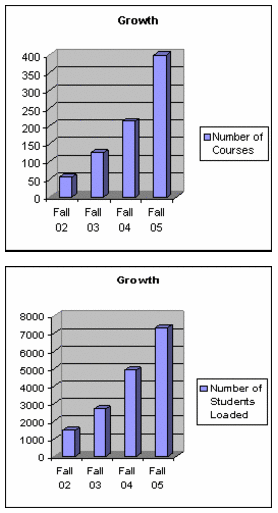
Blackboard Statistics!

Blackboard Statistics for Fall 2005
(as of August 29, 2005)
  • 400 courses
  • 135 instructors
  • 7328 students loaded

Hits to the Support Site for Distance and Distributive Learning
http://Tncc.edu/blackboard

Week of 8/22 – 8/28/05

  • 11,665 page views
  • 5,717 visits
  • 2,333 unique visitors

Month of August (through 8/29)

  • 23,838 page views
  • 11,797 visits
  • 3,825 unique visitors

Year-to-date

  • 151,574 page views
  • 104,474 visits
  • 18,427 unique visitors

Keep up the good work!!!!


Friday, August 19, 2005

Respondus, Softchalk and Impatica

Posted on Thursday, August 18, 2005 - 4:02 pm:

We have deployed a VCCS Faculty Software module on the Teach tab that links to download and installation for Respondus, Softchalk and Impatica.

It is set as removable and is also visible for placement.

Thanks David

David Carter-Tod
ITS - Client Services Virginia Community College System
dcartertod@vccs.edu

Monday, August 15, 2005

Blackboard Admin. Meeting Minutes 8/12/05

I've pulled out the revelant portions from the minutes (.pdf):

Changing Passwords
A couple of Blackboard Administrators reported that they are having problems with the instructor’s password in Blackboard 6 reverting to the date of birth.
One of the causes is that data integrity is now being enforced between Blackboard and My VCCS. If someone’s password “switches” to their date of birth, it is because it now synching their passwords. The reason for this issue has not occurred previously was in Blackboard 5, faculty accounts and passwords were created and managed in the GUI. However, in Blackboard 6, accounts are managed through My VCCS. If you have a faculty member whose password reverts to their date of birth, please direct them to the change my password in My VCCS to create a new, more secure password. Password changes are real time from My VCCS to other enterprise systems (please note that passwords in bbtrain and turtle are not updated.)
Another issue that was reported was that instructors are prompted to login when they try to access Blackboard through single sign-on. The ITS Blackboard team has not been able to reproduce this problem. If a user experiences this problem, please open an IssueTrak help ticket.

Blackboard System Settings
Personal Information and Address Book

The personal information and address book are currently turned on in production. These need to be disabled for users, since user data is updated in PeopleSoft. (Note: This setting was changed Friday, August 12 after the meeting.)

Self Enroll Setting
A Blackboard Administrator requested that the “self enrollment” setting be turned
on for faculty to allow students to self enroll in courses, without being batch loaded based on their PeopleSoft registration. Currently self-enrollment is turned off as a feature at the individual course level. This means that an individual instructor cannot turn it on, but a system administrator may do so by accessing the properties of the course from the System Admin control panel. The ITS Blackboard team was told this was inconvenient to have to do this now, when instructors were allowed to do this in Blackboard 5 themselves. It was also mentioned that self-enrollment would be helpful for Organizations.

Saturday, August 13, 2005

New Student Email System!

The new student email system went live Firday, August 13, 2005. The transition was transparent and successful and should pose no problems to your students.

Students' old mail is located at http://oldmail.vccs.edu/ and will be available until September 30, 2005. When students login to their email, they will see directions for forwarding all important messages that they may wish to keep. If you want to view what the students will see go to: https://email.vccs.edu/wm.

All documentation on the new student email (including FAQs) is located at: https://helpnet.vccs.edu/mirapoint/.

Faculty can also 'preview' the new system by logging in with their SIS/Blackboard UserID and password.

Friday, August 05, 2005

Students Loaded into Bb6!

I will begin loading students into FA05 courses on Monday and continue loading daily until the end of the Add period. As always I load but do not "drop". Please monitor you SIS lists!
-Ruth

Posted on Friday, August 05, 2005 - 6:17 pm:

We are pleased to announce that users (staff, faculty, and students) along with their primary and secondary roles have been successfully loaded in Blackboard 6 (learn.vccs.edu). One item to note is that students are active and enabled in learn.vccs.edu. Initially we said that they would be disabled, but we have discovered that as disabled, you would not be able to enroll them into your courses. If this poses a problem/challenge for you or your college, please let us know.

A couple items to note. Updates are passed from directory services to Blackboard twice daily, with the update process finishing at about 3:00 AM and 3:00 PM. Currently, password changes are only being passed to Blackboard according to this update schedule, but by go-live on Aug. 15, password updates will be real-time.

Additionally, if you are wondering why you have role "X" or don’t have role "Y", early next week we will provide detailed documentation as to the processes and algorithms for assigning primary and secondary roles.

David, Sue Ann, and Matt

VCCS Technology Projects Update

August 2, 2005


Greetings,

There are many critical projects that ITS staff members are working on at this time. The intent of this e-mail is to provide the colleges with updates on two of the projects that are nearing implementation.

Blackboard 6 Update

The upgrade of our Blackboard system is proceeding well and everything is on target for the August 15 upgrade to the version 6. With this new version, faculty and staff will have additional functionality, more flexibility and a greater capacity to enhance learning within the VCCS.

Preparations for this upgrade have been underway for the past year. ITS staff has been working with college Blackboard administrators, academic representatives and Blackboard consultants to optimize the configuration of the upgraded Blackboard environment so as to best serve our students, and to ensure a smooth transition.

There are three components to the upgraded Blackboard (version 6.2):

  1. The Learning System: This is the core course management system that students and faculty are familiar with, but it comes with new capabilities and new features that make it easier to use and a more flexible tool.
  2. The Community System: This is the entry way into Blackboard. With the addition of the Community System colleges now have the capability of branding the Blackboard environment with its own logo and color scheme. Additionally, colleges will now have the capability of personalizing the system display and targeting information to specific groups of users.
  3. The Content System: This is a tool to ease simultaneous content use across multiple courses and enable easy file storage and integration into courses. It also provides for document collaboration, and sharing. Additionally, faculty will have dedicated space where they can store documents and other digital files. Content System planning is currently in process. A six-week pilot is scheduled to start this September. Colleges participating in the pilot are GCC, JSRCC, PVCC, NVCC, NRCC, RCC, SVCC, and VWCC. Deployment to all VCCS faculty is scheduled for mid November 2005 for full use in production spring 2006.
    To recap some key dates and what has happened thus far:

To recap some key dates and what has happened thus far:
February, March, & May – Blackboard System Administrator training was provided to every college’s Blackboard System Administrator and back-up
April – Blackboard professional training was provided to faculty at the New Horizons Conference
May – All course content was migrated from Blackboard 5 to the Blackboard 6 environment
June 1 – VCCS faculty were given access so that they could begin working with the new system and developing course content
June – Strategy sessions were conducted with college representatives to prepare for the deployment of the Community System
June – The Community System was demonstrated to colleges remotely
June - July – Workshops were conducted to help colleges prepare their branded sites within the Community System
July – Content System strategy session held with representatives from colleges and the System Office to plan the pilot and initial implementation
August 1 - Final requests for Community System setup due
Here are some critical dates yet to come.
- August 5 - Student accounts loaded into Blackboard 6
(accounts will be unavailable for use until the 15th)
- August 15 - Blackboard 6 available to students
- September 19 – Content System Pilot begins
Following the deployment of the upgraded Blackboard environment ITS will work with Blackboard Administrators and other college representatives to coordinate the deployment of additional features that are now available within the new version of Blackboard. An incremental implementation of the new features is being planned to ease the transition and to allow each college time to provide training and instruction prior to the release of each new feature.

Thanks to everyone at the colleges who has worked with us during the training, strategy, and implementation. College staff and administration have generously given of their time this summer to make this upgrade a success. This has truly been a team effort between the colleges and ITS staff.

VCCS Student Email - Mirapoint

The Student Email sub-committee of the VCCS Technology Council concluded their work in late April 2005 and recommended the purchase of Mirapoint as the replacement product. Based on this recommendation and excellent references received from several Universities where the product is currently deployed, the ITS Office entered into negotiations with Mirapoint in early May 2005. Those discussions concluded with VCCS issuing a purchase order to purchase Mirapoint. Mirapoint is a state-of-the-art e-mail solution providing a web based interface where our students will be able to access their email and related email services from any place where there is access to the Internet.

The Mirapoint project is proceeding on schedule with an expected "Go-Live" date of August 12, 2005. A small group of participants from the colleges and the ITS Office have been actively testing the new system since the week of July 11th with good results to this point. A larger group with representatives from each college will continue testing over the next two weeks to isolate and correct several minor problems encountered during the early testing phase. If any issue should be discovered that may affect the timeline we will notify you immediately. Also, work is progressing on completing end user documentation and training materials. Additional information regarding the release of training materials, the deployment schedule, and a “to do list” for the colleges will be available prior to the “Go Live” date. Please contact Karlin Sink (KSink@vccs.edu) or 804.423.5631 should you have any questions or require additional information.

Please feel free to contact me with questions or concerns,

Neil

H. Neil Matkin
Vice Chancellor, Information Technology Services
Virginia Community College System
101 N. 14th Street
Richmond, VA 23219

nmatkin@vccs.edu
804.819.4991 (Office)
804.918.4769 (Facsimile)

Thursday, August 04, 2005

Cartridge Import Errors

Posted on Thursday, August 04, 2005 - 10:30 am:

We have had a number of faculty contact us about cartridge import errors, particularly with assessments. The usual error is along the lines of:
" The content item entitled "Multiple Choice Quiz" contained a link to an assessment. This link has been removed. Add the assessment to a content area and select Create an Announcement to create a new announcement with a link to the assessment."

The bottom line on these errors is that the import process for a cartridge does not delete the assessments, but it deletes the links to the assessments. This is standard behavior for a lot of cartridges in Blackboard 6. Faculty will need to use the Add Test option in the content spaces to add the links back.

David Carter-Tod ITS - Client Services Virginia Community College System

Monday, July 25, 2005

Blackborad 5 Incompletes

Students with an incomplete grade from spring and summer 2005 courses will have access to Blackboard 5 through December 31, 2005 to complete their work.

Blackboard 6 (http://learn.vccs.edu) will be available to students on August 15. At the same time, the current Blackboard url (http://bb.vccs.edu) will be redirected to Blackboard 6
(http://learn.vccs.edu). After this date, the only way to get to Blackboard 5 will be by a new url (http://bb5.vccs.edu). On August 16, all courses on Blackboard 5 will be made unavailable to
students.

Instructors have two options for students with an incomplete in a Blackboard course site:
Option 1: Moving Content to Blackboard 6 - http://learn.vccs.edu/ The faculty member can request from their college Blackboard Administrator that the course be exported from Blackboard 5 and imported into Blackboard 6 (all enrolled students from spring and
summer 2005 will have accounts in the new Blackboard 6). The student can then be enrolled in the course site. Student course data (grades, drop box postings, discussion board posts, etc.) will not be brought over to the new system. This is a good option for students that only need access to course content.

Option 2: Completing the course in Blackboard 5 - http://bb5.vccs.edu/ The second option is for the student to complete the course in Blackboard 5. All student accounts will remain in Blackboard 5. The risk with this option is that the Blackboard 5 system is no longer a
supported environment. Blackboard will end support for Blackboard 5 in September 2005, and the VCCS will not have any official support after our August 15 Blackboard 6 Go Live date.
If an instructor would like to use Blackboard 5 for an incomplete, it is the instructor’s responsibility to make the course available to students and to communicate the url for the course location (http://bb5.vccs.edu).To make the course available to students, go to the course ControlPanel, select Course Settings and then set Course Availability to Yes.

Exceptions and Constraints
If a college has a significant number of courses that should be left available after August 16, please submit them on a spreadsheet on an IssueTrak help ticket. The issue type is Blackboard 5. Blackboard 5 may only be used for incompletes and courses that started before August 15. If instructors foresee a reason for students to have access beyond that date, the course will need to be exported and imported into Blackboard 6. Faculty may also log on to Blackboard 5 to retrieve content that they still need from there. Faculty should be aware however that the server, while functional, will not be actively maintained as a production server.

Blackboard 5 will no longer be available after December 31, 2005.

Tuesday, July 19, 2005

Changes to DSII (tncc.my.vccs.edu)

Posted by Matt Lawson on Tuesday, July 19, 2005 - 10:22 am:

For learn.vccs.edu, passwords are not yet synchronized real-time with directory. By go-live, (actually sometime before) there will be real-time password synchronization with learn.vccs.edu and directory services.

Currently, there is password synchronization, but it is done as a batch process twice a day at 11 AM and 11 PM. So if a user's password is changed in learn.vccs.edu, at 11AM/PM it will be synchronized back to directory.

If a user changes their password in directory, it wont get updated in learn.vccs.edu until 11AM/11PM.
http://tncc.my.vccs.edu/ (Directory Services II)

Friday, July 15, 2005

Blackboard Performance Testing

Posted by David Carter-Tod on Friday, July 15, 2005 - 4:45 pm:

Over the next three weeks we will be performance testing our Blackboard 6 system with a Blackboard Engineering Consultant.

Each night from 6:00 p.m. until 10:00 p.m., the system may be slow or unavailable. We apologize for any inconvenience this may cause.

It is, however, critical work as we prepare to ensure a seamless start to the Fall semester.

Thank you Matt, David and Sue Ann

Student Access and Blackboard 5

Students will be given access to this Blackboard 6 system on August 15 at 8 a.m.
At that time, bb.vccs.edu will start to redirect to learn.vccs.edu.
To access the previous Blackboard 5 system, all users will need to go to bb5.vccs.edu.

Friday, July 08, 2005

PeopleSoft Integration with Blackboard

Posted by David Carter-Tod on Friday, July 08, 2005

One of the elements that we have discussed and planned for with Blackboard 6 was the automatic creation of classes based on PeopleSoft data and the resulting automatic enrollment management that would come with that. As we have indicated in our meetings, we have been working towards implementing that for Fall.

However, we are at the point where we need to reconsider that deadlinefor a number of reasons.

Our top priority is system stability and performance. Dedicating resources to the integration work will consume time that we need to spend on these elements.

After reviewing the business processes at all the colleges, we understand that there is a wide variety in practice at the colleges. We need more time to work together as a group to come to a consensus as to how best implement the integration. We have focused on introducing the new functionality, most notably the roles in the Community System. The roles in the Community System have formed the groundwork for our implementation of the Content System which is targeted to be released to all instructors in November. With theContent System in place, it will change how faculty manage and store their content for their courses. One consideration has been that many instructors merge and collapse course sections in order to not edit the same piece of content in multiple locations. We need the additional time this fall to study how faculty usage may change withthe implementation of the Content System and use that data to inform how we do our integrations.

We will convene an integration workgroup this fall to begin working onthe integration. We plan to have the group use the data gathered fromthe Blackboard course creation and enrollment business process interviews to draft a recommendation on how best to proceed with theintegration of Peoplesoft user and course data with Blackboard.

Thank you for your patience and understanding.

Matt, Sue Ann and David

Sunday, June 19, 2005

Bb 6 Internal Server Error Explanation

Explanation for the following frequently encounter Bb6 error message :

Internal Server Error

The server encountered an internal error or misconfiguration and was unable to complete your request.

Please contact the server administrator, learn@vccs.edu and inform them of the time the error occurred, and anything you might have done that may have caused the error.

More information about this error may be available in the server error log.

Apache/1.3.33 Server at utbc02b04v02.vccs.edu Port 800


Posted by David Carter-Tod on Saturday, June 18, 2005 - 8:50 pm:

By way of explanation as to why some people might get the error andothers will not.

When you log on to Blackboard 6, one of the cookies that is set is "BB6ProdBigIP". This identifies which backend application server your session goes against. It has an 8-hour expiration, so once it is set, you will typically continue to go against that application server.

Others (even the person at the next computer) may be going against another server and keep going against that server. If one server is having a problem, it will only show up if your session is tied to that problem server via the cookie.

If you delete the cookie, you might be reassigned back to the same server, but with luck you might be assigned to a working server.

We are working on addressing this issue so that our load balancer ismore intelligent about detecting internal server errors and will re-assign people automatically when they occur.

Thanks

David

Thursday, June 16, 2005

Server (URL) clairfication from Sue Ann

Posted by Sue Ann Curran on Thursday, June 16, 2005 - 9:30 am:

Blackboard 5 (http://bb.vccs.edu)
This is our current production environment until August 15. All courses that begin prior to August 15, will be in Blackboard 5. Students with spring and summer 2005 incompletes may continue to have access to this server.

Administrators have the option of moving the courses to Blackboard 6 after August 15 or allowing the course to continue on Blackboard 5. (You must let me smithru@tncc.edu if this appys to your situation.)

This server will be retired on December 31, 2005. Any course work that needs to be completed after the end of December must be moved to Blackboard 6.

Blackboard 6 Production (http://learn.vccs.edu)
This site is where courses for fall 2005 and later are to bedeveloped. It is also used for training on current functionality. All instructors are loaded on this server and it is updated twice daily.
(If you can not log in to this server contact me smithru@tncc.edu )

Wednesday, June 15, 2005

Blackboard 6 and Pop-up blockers don’t MIX!!!!

A "Pop-up Blocker" is computer software that, once installed on your computer will prevent unwanted windows from appearing on your screen. This means, as you browse the internet, the pop-up blocker prevents new browser windows from opening.

Blackboard 6 works with pop-up windows in many locations. It may be necessary to disable your pop-up blocker or set it to allow the Blackboard 6 site to use pop-up windows.

What to do: http://www.tncc.edu/blackboard/popup.htm

Thursday, June 09, 2005

Blackboard 6 and Fall 05 courses

DO NOT WAIT UNTIL THE FALL SEMESTER BEGINS TO DO THIS.

Contact me if any of the following fail. Detail, as much as possible, for a quick resolution.

  1. Check to see if you can login to Blackboard 6. http://learn.vccs.edu
  2. Check to see what email Bb6 has for you. Directions: http://tncc.edu/faculty/smith/verify.htm
  3. Check to see if your Fall request made it to the new server. (Only 45 courses seem to have made it over-- typically we run 250+ classes)
  4. Request a FALL 05 (or RE-REQUEST) container if you don't see a class in your Bb6 space. http://tncc.edu/faculty/smith/bb.htm

CALL ME IF YOU HAVE QUESTIONS OR CONCERNS.

Tuesday, June 07, 2005

DDLC Meeting Minutes

Distance and Distributed Learning Committee Meeting
June 3, 2005
AT Blue Ridge Community College
I. Welcome and Introductions

Dr. John Downey, Committee Chairperson, welcomed the group to the meeting and Dr. Sullivan to the VCCS. John explained to Dr. Sullivan the role of the DDLC in advising him on academic matters as they relate to technology, distance and distributed learning. John indicated that the DDLC was working closely with the Technology Council and the IT side of the VCCS to foster excellent communication and informed decision making.
II. Position Paper

John briefly reviewed the history of the development of a position paper on the status and future of distance and distributed learning relative to the goals of Dateline 2009. Committee members carefully reviewed the second draft of the paper, and made several suggested edits. Leslie Smith made the motion to endorse the revised draft of the DDLC position paper with the changes made during the meeting. Scott Langhorst seconded the motion. The motion passed unanimously. The revised position paper is attached to these minutes.
John indicated that the final draft would be presented to ASAC as an information item on June 6th and 7th, toward the goal of gaining ASAC endorsement at the fall meeting of VPs and Provosts.
II. Process needed to evaluate “Plug-ins” and other software requests from colleges.

The next agenda item concerned the point that there has been no process, nor single group, that addresses requests from colleges for the purchase of state-wide software product procurement. John cited the example of plagiarism detection software that several campuses have purchased on their own. As the demand for such software has grown, individuals have petitioned the VCCS to buy the blackboard plug-in for that software. Other examples cited include plug-ins and software for voice recording that can tie into blackboard, web conferencing software like Breeze, Centra and Elluminate, and any of the 150 plus plug ins that are likely available for use in Blackboard 6.0.

John suggested a process whereby colleges would fill out a brief form documenting the purpose or need the college sought to address with a particular software product. The college would be asked to name any known competitors to the product, the academic reasons for desiring certain features etc. Once the need was documented, a small group of DDLC members, VCCS IT and academic staff and faculty could be charged with evaluating each request and making a recommendation to the DDLC. The DDLC would then make a recommendation to the Vice Chancellor for Academic Services who would work with the Vice Chancellor for ITS to obtain approval in consultation with the technology council. John acknowledged such a process could be lengthy and burdensome and sought other ideas for the evaluation of enterprise software or negotiated priced software with a college “opt-in/opt-out” option. The discussion continued with no clear consensus on developing such a process. Some members pointed out that the role of DDLC members agreed that John would work with David Carter-Tod on the VCCS staff to draft such a written proposal for a process and discuss it next meeting. John and David agreed.
IV. Update on Blackboard 6.0

David Carter Tod and Sue Ann Curran updated the DDLC on the Blackboard upgrade. 9470 courses were migrated successfully. About 1000 courses did not have a faculty member associated with them and the VCCS was working with blackboard administrators to identify those faculty and link them with the courses. The IT staff is also working on continued issues associated with multiple EMPLIDs.
Next steps include deployment of functionality beyond what was available in BB 5.5. Staff is working on creating a small consulting workgroup to address questions associated with features available in 6.0. The major features include a community system, a content system, and integration of BB with other VCCS enterprise products like student e-mail and SIS. Policy issues identified by the small group will be brought back through DDLC for advise, and to ASAC and Tech council for action.
V. Update on VCCS Portal

Scott Langhorst made a comprehensive presentation on the progress TCC was making on the creation of a portal, its benefits, and its challenges. He sought help from the DDLC and specifically requested that any members who served on the DDLC portal committee and anyone else interested join in the discussion and planning for a VCCS portal. Scott asked that any DDLC members who could assist with the VCCS portal project please e-mail him at slanghorst@tcc.edu.
VI. Proposed meeting dates

John distributed a list of proposed meeting dates for the DDLC (Also attached to these minutes). He indicated that the dates take into account ACOP and Technology Council dates but not the ASAC meeting dates which were not yet determined. DDLC members agreed to the dates and will adjust them if they interfere with ASAC dates. DDLC members also agreed on a two-day meeting in September focused on goal setting for the year to be held in Charlottesville. John will work with Mary Clare to get that meeting arranged.

VII. Governance and bylaws.

John indicated that the DDLC is operating as an advisory body to the Vice Chancellor of Academic Services and Research, but has no bylaws or operating governance structure. John suggested that we may want to address this in some future meeting. In the meantime John suggested that an election be held for chair and asked for nominations. John was nominated and elected to serve another year as chair.
VII. Virginia Education Wizard.

Neil Matkin presented on the Chancellor’s interest in pursuing another federal earmark. This earmark would be dedicated to the creation of the “Virginia Education Wizard”. The Wizard is a concept for a search engine type technology dedicated to helping Virginia’s citizens gain easy access to information about careers and educational opportunities available to them. Rather than searching for “a needle in a haystack” the project would create a system where the user could set specific search parameters and the wizard would “reply” with specific information that responds to the users questions. Neil’s PowerPoint presentation on the Wizard, along with the federal earmark proposal, will be sent to DDLC members via e-mail. (If you are interested in getting a copy of this contact Ruth Smith and I will forward you a copy,)

There being no other business, the meeting adjourned.

Friday, June 03, 2005

Hands-On Workshop: Super Users Bb 6

To register: email: smithru@tncc.edu (indicate in email the time you wish to attend)
Workshops with 0 advanced registrations will not be held.

Workshop: Checking and Cleaning Up Migrated Courses

Description: This workshop is for faculty who have had courses migrated from Bb5 server to Bb6 server. NOT new users. We will cover how to fix broken links, how to reset left navigation menus, how to reset course cartridges (if necessary), a quick overview of new features.

Note: This workshop is scheduled for 2 hours - the first 45 minutes is guided instruction, the rest of the time is for you to work on course clean up, with assistance as needed, and/or question and answers about new features in Bb 6. You should try logging into Bb6 to be sure you can prior to the workshop. http://learn.vccs.edu. Contact me ASAP if you have trouble with login and password. Your password should be the same as your current SIS (Peoplesoft PW).

Location: Diggs Hall- Room 120

Dates/Time:

  • Monday-- June 13, 2005 -- 11:00 am - 1:00 pm
  • Tuesday-- June 14, 2005 -- 11:00 am - 1:00 pm
  • Thursday-- June 16, 2005 -- 9:00 am - 11:00 am
  • Tuesday-- June 21, 2005 -- 1:00 pm - 3:00 pm
  • Wednesday-- June 22, 2005 -- 1:00 pm - 3:00 pm
  • Thursday-- June 23, 2005 -- 1:00 pm - 3:00 pm


Thursday, June 02, 2005

Migration Errors

The VCCS migrated 9,470 courses to the Blackboard 6 system. The following courses could not be associated with valid instructor accounts from Directory Services. If this is your course please let me know (via email smithru@tncc.edu) so I can attach your Bb 6 login to it.

Directions: Copy and paste the course ID into the email message. You must also include your Bb login.

TNAST2360000FA04 TNBUS100001HSP05 TNBUS2350D01HSU05 TNENG001003HSP05 TNENG102001HSP05 TNENG111019HSP05 TNENG111042HSP05 TNENG112044HSP05 TNHUM201040HSP05 TNIST112091HFA04 TNIST117014HSP05 TNIST123091HSU04n TNIST176040HFA04 TNISTDSY0001SP05 TNITE1150000SP05 TNMTH152040HSP05
TNPHI101041HSP05

Tuesday, May 31, 2005

Announcement from Sue Ann Curran on Tuesday, May 31, 2005 - 4:14 pm:

We are pleased to let you know that the migration and preparation for production availability on June 1 is going well. Blackboard 6 will bereleased by the end of the day tomorrow.

The url will be http://learn.vccs.edu/

As we have mentioned, there will still be work to be done after it is released tomorrow, particularly with tuning and load testing, and the community system configuration options. We will keep you informed of any developments.

Thanks Matt, Sue Ann and David

Wednesday, April 20, 2005

Confusing - READ carefully

To see what I submitted on April 21, 2005 for Migration (Copied to Bb 6 PRODUCTION server):
http://www.tncc.edu/faculty/smith/migration/migration_list_tncc.txt
  • ALL courses that end with 05 will be migrated (even if you asked that it not be migrated). We will clean up unwanted courses after the migration.
  • I could not honor requests to add to our list, courses developed at another college (see next bullet).
  • If we missed a course - DON'T panic! There is one last thing we can do to preserve a course. I will outline the FINAL procedure prior to the Bb 5 servers' demise (before the VCCS pulls the plug!).

Important Dates:

  • May 1-Course migration starts (from the list I submitted). Any changes you make to a Bb 5 course after May 1st will not be reflected in Bb6.
  • June 1-BB6 Production server available to faculty. You will check your migrated courses and "tweak" as needed for Fall 05.
  • After June 2 - there will be a new way to request NEW courses for Fall 05. These procedures are as yet to be defined and will be forthcoming.
  • August 15-Students go live ! Begin teaching with Bb 6.

Note (if it wasn't confusing enough *grin*):
Currently we are running several server environemnts (listed below are the ones that have an impact on faculty):

  • Bb6 Train - http://bbtrain.vccs.edu
    This is an environment designed to resemble BB6 production. It is available for faculty course development and training. This will have the same look and feel of the production system, but will not be built to the scale necessary for production. Course material developed by faculty through June 7 will be migrated to production the following week. After the August 15 Go Live for the version 6 production system, the Training environment will be used in an ongoing way to introduce faculty to new features and functionality prior to release in the production environment.
  • BB5 Production - http://bb.vccs.edu/
    This is the current production system. On August 15 it will be moved to
    http://bb5.vccs.edu and will become a “read only” resource for faculty. Student access will be disabled . This environment will be available to faculty until December 31, 2005.
  • BB6 Production - http://learn.vccs.edu/
    This will be the future production system. It will be available to faculty on June 1 and will Go Live for students on August 15.

URLs

The new permanent URL for BB6 will be
http://learn.vccs.edu/. From June 1 through August 15 this will be the only way to get to the system. After August 15, http://bb.vccs.edu/ (and http://www.bb.vccs.edu/) will be redirected to http://learn.vccs.edu/. This will ensure a seamless transition for students. At the same time, BB5 Production will be moved to http://bb5.vccs.edu/. http://bb.vccs.edu/ will be retired July 1, 2006.

Tuesday, April 19, 2005

Learn what's new and different in Bb 6.2

What’s New and Different (presentation)
Learn what's new and different in Bb 6.2
Topics Covered:
  1. Course Settings
  2. Content Area and Tools Features
  3. Quizzes and Assessments
  4. The Online Grade book
  5. The Assignment Manager (Replacement to the Digital Drop Box)
  6. The Collaborative Environment

Date: April 27, 2005
Place: Diggs Hall, Room 159
Times:

  • 10:00a-10:30a
  • 11:00a-11:30a
  • 12:00p-12:30p
  • 1:00p-1:30p
  • 2:00p-2:30p

To register: email: smithru@tncc.edu (indicate in email the time you wish to attend)

Workshops with 0 advanced registrations will not be held.

Saturday, April 16, 2005

A first peek at Bb 6

Posted by Matt Lawson on Friday, April 15, 2005 - 5:04 pm:

The ITS Blackboard team is pleased to announce that http://bbtrain.vccs.edu is available.

The accounts that were loaded on the bbtrain are all of the users from Blackboard 5 who met both of the following two conditions:
  1. They were an instructor in at least one Blackboard 5 course
  2. We were able to tie their Blackboard username to a valid DS2 username

A couple of reminders about the bbtrain environment:

  1. This environment will be shut down on June 1. After it is shutdown, all the courses that are on bbtrain will be migrated to production version of Blackboard 6. After June 1, bbtrain will become an environment were we will be able to show faculty new features and not-yet-implemented features of Blackboard 6.
  2. We want to minimize use of bbtrain. The bbtrain environment is only for faculty who cannot wait until June 1 to start building their Fall 2005 production courses. (If you need this ability contact me - Ruth Smith... However you will have to be able to work independently from documentation.)
  3. If for whatever reason a faculty account does not exist on bbtrain, feel free to create an account for that faculty. Please remember though that in the ultimate production environment, only user names from DS2 will be loaded into Blackboard.
  4. Although we do not anticipate dramatic changes to the bbtrain interface, there may be some changes as we customize the Bb6 interfaceand fine-tune its settings.

Thursday, April 14, 2005

Impatica

Volume 01-03 - April 15, 2005

  • Designing for Performance: Dividing Large Presentations
  • PowerPoint Text Alignment
  • Replace Missing Fonts in PowerPoint

Volume 01-02 - March 31, 2005 ·

  • Impatica Video Settings
  • -imp.jar
  • OnCue Shortcut Keys
  • Custom Install of QuickTime

Volume 01-01 - March 15, 2005

  • Designing for Performance
  • PowerPoint Slide Master
  • LMS Systems · Embedded Sounds

Subscribe to Impatica Tips.


What is Impatica?
Software that converts PowerPoint files to a small, web-frie
ndly format, even if they include narrations and animations. The VCCS has a system-license.

Where do I get Impatica?
Download Impatica from Blackboard.
Login to Blackboard
My Organizations > Faculty Help Site >Impatica

Respondus Test Bank Network


The Respondus Test Bank Network contains test banks for the leading textbooks in higher education. The test banks are in Respondus format and can be downloaded for free by instructors who adopt a participating textbook.
The Respondus-formatted test bank at no charge.


  • Download Respondus from Blackboard.
  • Login to Blackboard
  • My Organizations > Faculty Help Site >Respondus

    The directions on the website are old. You need to email me for the new activation password.

Repsondus is a great way to "archive and create pools" all of your tests in Bb 5 (publisher and even the ones you made up) and have them ready to upload in Bb 6.

I recommend you do this before we migrate to Bb6!


Reminder: I must submit a final (verified) list to the VCCS by April 21st for the migration.

Tuesday, April 05, 2005

DDLC Meeting Minutes 03/18/05

Distance and Distributed Learning Committee Meeting
March 18, 2005
Via Distance Learning Technology: Macromedia Breeze

In attendance:
Dr. John Downey (Chairperson; BRCC), Susan Beasley(CVCC), Kristen Kelly (JTCC), Sara Brown (LFCC), SusanKennedy (MECC), Linda Claussen (NRCC), Monica Sasser sitting in forSteve Sachs (NVCC), Carolyn Byrd (PHCC), Mary Clare DiGiacomo (PVCC), Leslie Smith (RCC), Bill Hightower (SSVCC), Stacy Harris (SWCC), Scott Langhorst (TCC), Charles Boiling (VHCC), Inez Farrell (VWCC), and Jaime Shetrone (WCC). From the System Office: Dr. Neil Matkin, Dr. Carole Schultz, Tim Tirrell, Bob Vawter, Ralph Lucia, and Sue Ann Curran. Guest: Blair Potts (SSVCC).

I. Welcome and Introductions
Dr. Downey,Committee Chairperson, welcomed the group to the meeting. He thanked Blair Potts for arranging to host the meeting via Macromedia Breeze.

II. Update from Dr. Neil Matkin, Vice Chancellor for Information Technology Services
Dr. Matkin updatedthe committee on the status of the enterprise system upgrades. He reported that the Peoplesoft 8.0 SIS upgrade was generally progressing as expected andthat the go-live process arrived with relatively minor issues. A few issuesemerged with the simultaneous upgrade of Directory Services 2.0, and the ITstaff at the VCCS was busily working on addressing those. Finally, the upgradeof the Blackboard 6.0 LMS was delayed one semester due to a delay in the delivery of equipment. The LMS upgrade is now scheduled for Summer, 2005.

III. Position Paper
The bulk ofthe meeting time was used to discuss and revise an initial draft (appended tothis document) of a DDLC position paper authored by John Downey. The purposeof the position paper is to identify the state-wide obstacles to thecoordinated implementation of distance and distributed learning objectives listed in the Chancellor’s current goals, Dateline 2009 and the 2001 Strategic Plan for Distance Learning.
The draft was discussed in stages as outlined below.

SECTION ONE: BACKGROUND AND OVERVIEW:
DDLC Member comments;
  1. Several members made the suggestion that specific goalsfrom the three documents listed (Chancellor’s goals, Dateline 2009 and the Strategic Plan) that are related to distance and distributed education beincorporated directly into the document itself at the end of line 36 in theattached document).
  2. One member suggested making sure the document capturesboth the positives as well as the obstacles to implementing distance learningprograms and courses in the VCCS.

SECTION TWO: Distance Learning VCCS Values:

  1. A suggestion was made to re-order the values listed,with the statement on mission listed first and the statement on quality listedsecond. (See lines 54-59).
  2. Several individuals believed the focus on quality issueswas critically important. Some indicated that issues of student success wereintegrated with the degree of student support provided system-wide.
  3. Some members discussed the quality issue in relation toperceptions of quality assurance in traditional classroom courses, suggesting aneed to focus on quality across all methods of delivery, not just in relationto distance learning delivery.


SECTION THREE: Primary Benefits of Distance Learning:

  1. Members suggested a re-wording of this section toprovide greater clarity. From the perspective of colleges, there are twobenefits to providing access to distance learning in a service area: First, sothat constituents in that service area can access programs and servicesotherwise unavailable at the local college and second, to increase access orprovide greater convenience for constituents to access programs and servicesthat are already provided locally.
  2. Some members suggested also listing benefits tostudents. In particular, distance learning provides access to a variety oflearning styles that may or may not be available in traditional classrooms.

SECTION FOUR: Current Distance LearningMethodologies:

  1. Members suggested re-ordering the methodologies from themost frequently used method (web-delivery) to the least frequently used method(compressed video). See lines 78-85.
  2. Some members advocated adding usage data to this sectionto reflect the preferences of students and faculty for each methodologylisted. Other members advocated adding some reference to hybrid methodology(where distance learning is mixed with some on-campus classroom-based methods)OR other forms of mixed technology delivery methods.
  3. Some discussion centered on whether the increasedreliance of distance learning methodology was attracting new students notpreviously served by the VCCS or whether existing students already served byVCCS colleges were opting for the convenience of distance methodologies. Questions concerning class size and productivity relative to distance learningversus classroom methodologies were also discussed.

SECTION FIVE: Challenges:

  1. The slight modification to the title of this section:“Challenges t the Proliferation of Distance Learning in the VCCS”, was suggested. Specifically a member suggested changing the word proliferation to“Coordination.” See line number 87
  2. Given the purpose of the position paper, most membersconcurred with the four preliminary issues listed. Again, members advocatingre-ordering the list: First, the issues that are perceived to impact thegreatest number of students should be listed, followed by the to the issuesthat are perceived to impact the least number of students.
  3. Several additional issues were suggested to be added tothe list. These include:
    A discussion of obstacles related to registration issues for students desiring to take coursesfrom multiple colleges.

Clarification ofwhich issues the VCCS should be viewed as having the authority to implementstate-wide standards versus issues that VCCS provides guidance for but local colleges have ultimate authority.

  • A statement advocating the joint appointment of faculty members across two or more colleges.
  • A statement regarding the advocacy of a common calendar across colleges for distance learning delivery OR at least a statement addressing the issues that arise for students due to the lack of a common academic calendar.
  • A general statement regarding funding challenges to implementation of an increase in the number of distance learning courses in a system where college-based FTEs regulate funding.
  • A statement advocating minimal staffing for distance learning support, with clearguidelines/job descriptions for those positions.
  • Others?


Process for DRAFT TWO of the PositionPaper


At the conclusion of the meeting, Dr. Downey agreed toconvene a subcommittee of the membership to work on a second draft of the position paper for presentation to the entire DDLC at the in-person meeting on June 3, 2005. That group will be convened inmid to late May.


IV. Next meeting:


The next meeting of the DDLC was scheduled for Friday June 3, 2005.
The June 3 2005 meeting will be an in-person meeting to be held at Blue Ridge Community College, Robert Plecker Workforce Center, in Weyers Cave.
Details will be sent out in early May.


There being no other business, the meeting adjourned a little after 11:00AM.


APPENDIX
INITIAL DRAFT OF A DDLC POSITIONPAPER ON THE CHALLENGES PREVENTING FULLER SYSTEM-WIDE IMPLEMENTATION OFSTRATEGIC DISTANCE LEARNING GOALS

Saturday, April 02, 2005

I must submit a final (verified) list to the VCCS by April 21st

Please fill out the form(s) located at: http://tncc.edu/faculty/smith/migration/tncc.htm
FAQs are located at: http://tncc.edu/faculty/smith/migration/FAQs.htm

The website consists of the original submission that TNCC sent to the VCCS for migration from Bb 5 to Bb 6. The list also includes courses for all SP05, SU05 and FA05 created on or before 03/28/05.

I must submit a final (verified) list to the VCCS by April 21st

Below is the way the VCCS sent me the file. I apologize for not being able to match courses with instructors but please try to help me verify the submission list. The way to read the course code is as follows:
(example) TNENG211015HSP05

TNENG211015HSP05
College (TN)
Course (ENG)
Course Number (211)
Section Number (015H)
Semester (SP05)


I really need to hear from all Blackboard Faculty to help ensure a smooth(er) rollover!

Friday, April 01, 2005

Selected Minutes from LSA (Blackboard) Meeting

(I've highlighted in red area of particular interest to faculty - pay particular attention to dates and deadlines)- If you have questions or comments please click on the comment button, email, or call me.

Learning Systems Administrators Audio-Conference
3/30/2005
1:30 p.m. – 3:30 p.m.


Attendees:
Kristy Walker - RCC, Blair Potts - SSVCC, Sadie Hastings - TCC, Jennifer Smith - CVCC, Jeff Burleson – ME, Rebecca Kittelberger – SO, Ginny Scott - GCC, Charles Boling – VHCC, Jamie Shetrone - WCC, Amy Abbott – DCC, Kristen Kelly – JTCC, Ruth Smith – TNCC, Michelle Gee – NVCC, Stacy Harris – SWVCC, David Carter-Tod, Sue Ann Curran, Matt Lawson - ITS, Mary Clare DiGiacomo - PVCC, Adam Bryant - NRCC, Jim Blackburn – BRCC, Sara Brown and George Hoffman – LFCC, Colleen Kehoe – JSRCC, Shelia Hobbs and Zakary Wade - PDCCC.

Blackboard upgrade status (David Carter-Tod and Matt Lawson)

    • Hardware arrival – The IBM Blades, the hardware that will run the BB6 enviroment, arrived last week. They are being installed now and we intend to load the Blackboard software soon.

    • BBTrain clean-up – We want the training and development environment to reflect the production environment. We intend to wipe it clean after the close of business on Friday. This was not a problem for anyone on the call. Only VWCC courses are being developed on that system and we have notified and worked with them separately. BBTrain will be backed up.

    • Bb6 Sandbox availability – this environment will initially be used for experimenting with system settings. We do not intend to experiment with system settings on BBTrain since it is to mirror production. After that, it will be available to LSAs to experiment with and potentially show new features to early adopter faculty. Please be aware that the sandbox will not be backed up.

    • Enrolling of faculty – All faculty teaching accounts from Bb 5 will be moved to Bb 6 Train to reflect production.

    • Course lists will be sent on Friday to BB Admins. David will send out course lists to be migrated on Friday for each admin to review. Please return these lists to XXXXXXX by April 22. The list will consist of the original list that BB Admins sent, as well as all sp05, su05, fa05, and sp06

    • After faculty have access to the training environment, they can develop courses there. We will migrate courses from BBTrain to BB6 production at the end of May. Bb Admins should provide a list of BBTrain courses to migrate in late May to XXXXXXX.

    • Jim asked if there was a way to batch load courses from Blackboard 5 into Blackboard 6. There is not and we do not plan to do this, but BB Admins may do this manually for faculty. Faculty may also do their own export from BB 5.5 and import into BBTrain, as long as they have a course shell already.

Functionality Roll-Out (Sadie Hastings)

Following her post on VCCS Discuss, Sadie Hastings initiated a discussion on the availability of functionality in Bb6. The core question was whether we would use roles and allow LSAs to selectively release functionality to their colleges, e.g. to early adopters, or for training purposes. Also, there was a question of whether specific pieces of functionality, i.e.

messaging and the content system

would be available at the beginning of Fall.

The core answer is that from a technical performance perspective we need to start Fall with a "clean system" so that we can get a benchmark for performance and establish system stability with as few variables as possible. This is so that when we do add features we can see how they affect the system, and if there’s a problem, we can quickly isolate the problem.

Once we’ve established the benchmark, we can move ahead in introducing functionality, and intend to do so aggressively. The recommendation from Blackboard, and other schools who have migrated, is to be conservative when initially moving to version 6.

From a support perspective, getting over the 5.5 to 6 migration first will mean that later we will have more time to support new functionality.

Go Live Date for students: What about courses that are ongoing and courses that have continuous enrollment? They will be in progress when we go live with 6. We will need a consistent Go Live date across the system and will need to work on that.

Colleges will not have access to the Content System at the beginning of the Fall semester.

We are working with Blackboard to create a roll-out plan for the content system, and will work with the workgroup and governance groups in that process.

It was asked that we talk with the Blackboard instructors at New Horizons, so that they could make faculty aware that some of the functionality presented will be rolled out gradually. The Content System is only being shown during demonstrations and not in the workshops.

Blair asked if roles could be more aggressively pursued for the summer, and if advanced functionality could be made available on the training server so that he could work with early adopter faculty on new features. Initially the BBTrain environment will reflect the production environment and it was recommended that LSAs could use the Bb6 Sandbox to work with features that are not yet released to production.

The BBTrain server will become available to faculty by April 15. As of now, the url will still be bbtrain.vccs.edu

, but suggestions for alternatives are welcome. We will continue to use the same course naming conventions.

If faculty want to bring in their own course to BBTrain or BB6 production, they will need to export their course from Bb 5.5. The training server is for faculty who cannot wait until June 1 to start developing courses. If faculty can wait until then it is preferable for them to wait until June 1, because they don’t have to worry about the import/export process from 5 to 6.

Will we have a list of what is and what is not available, so that LSAs know how to develop their training for faculty? Sadie can modify the document to reflect the decisions of the groups.

There followed a discussion about the problem of multiple Emplids still being created and how those would be handled.

There was also a discussion about the change in the Student Email policy recently approved by the Vice-Presidents.

The meeting ended, rather abruptly, at 3:30 when we ran out of time!

Friday, March 25, 2005

Publisher Content in Blackboard

Course cartridges (content from a publisher) are usually delivered in 3 ways:

  1. The publisher sends the instructor a download key. If the publisher sends you a download key you can "install it" yourself into an existing course container.
  2. The publishers sends the instructor instructions for downloading a .zip file. The instructor downloads the .zip file and must send the file to the Blackboard Administrator. An instructor cannot install a .zip file themself. This process must be done to a "new" course container.
  3. The publisher sends the Blackboard administrator a .zip file. The Bb administrator has to begin the process from a "new" course container.

How to install your own download key:

Step 1: Bb administrator creates a course shell for you.
Step 2: You request a download key from your book rep or via the publisher’s website.
Step 3: Once you receive the key do the following:

  • CONTROL PANEL >COURSE UTILITIES > IMPORT COURSE CARTRIDGE
  • Enter the Download Key and Click Submit.
  • You will get a Receipt: Success and message telling you that you will receive e-mail notification when the Cartridge content has been installed.


Wednesday, March 23, 2005

FYI- information concerning Directory Services, passwords, use in Blackboard and student email

Issue: Faculty Passwords Changed in Blackboard
SISCOPYID updates—necessary to enable proper security roles in SIS Version 8—triggered the pushing of the password contained in the Directory to Blackboard. This was, more often than not, the old PIN password format. As the SISCOPYID changes have happened, faculty members have found themselves unable to log in to Blackboard, because the Directory password overwrote the password they had previously been assigned by their LSA.

The immediate solution is for users to change their password at https://tncc.my.vccs.edu and accounts will be synchronized across all systems.

Issue: New Accounts for Students with Multiple Emplids
Many students with multiple SIS Emplid’s have discovered that a new Blackboard and email account was created for them when looking up their username at https://tncc.my.vccs.edu. Their old email and Blackboard accounts are not connected to their DS2 usernames, which means they cannot access their Blackboard or e-mail content through https://tncc.my.vccs.edu. The migration of data to DS2 carried over accounts with the most recent activity for students with multiple emplids. It created new accounts for the less active emplids. VCCS ITS will correct this issue with a batch process on Thursday evening. After the process is run, most students with this problem will have reverted back to their former accounts. There is a subset of these affected students who shared a Blackboard and Email username across their multiple emplids. These students will not have their account reverted to their old username. This is a design issue with DS2 which we are continuing to address.

If students have used their new email account, they will be able to access it directly- http://email.vccs.edu/index.pl, not through My VCCS. These new accounts will be removed from the email system when those students who have used them have been notified by ITS.

Sunday, March 20, 2005

Faculty Development Activities – Student Success in Online Learning

Instructional Technology and Distance Learning will fund a few faculty development activities that focus on student success in online learning. The purpose of the activity should address areas that are barriers to student success in online learning. The proposal should include how the effectiveness of the activity will be assessed – higher success rate, increased student retention, or some other measurable outcome related to student success.

Topics of interest: Quality assurance, best practices, course design, interactivty/ communication, academic support, teaching strategies, digital resources, competencies for online students and/or online faculty, information literacy skills, etc.

Average funding support: $3,000 (collaborative projects – if more than one college is involved, up to $5,000 can be requested)

Number of proposals to be funded: up to 10

Deadline for proposals: Proposals may be submitted starting March 21, 2005. Proposals will be reviewed as they come in for feasibility and funding. Last day for submission of proposals is April 20, 2005.

Notification of proposal status: 7 days after proposal is received

If you would like to submit an idea for funding through this initiative, please provide the following information about the activity:

  • Description of the project: (one page); should describe the purpose of the project and how it will be carried out – workshop, seminar, etc. Include dates of the activity.
  • College(s): List all colleges participating in the activity and how many will attend
  • Funds requested: itemize each element and provide cost; indicate any support from the colleges
  • Primary contact for the activity:

College Approvals and contacts: College approvals are required for proposals to be considered. Please be sure you are getting the appropriate approvals for your college. If more than one college is involved, signatures from all institutions are required. Signatures page may be faxed.

  • Immediate supervisor of the primary contact:
  • Academic Vice President:
  • Grants Office: (if applicable)
  • Business Office contact and account where funds should be transferred: (If there is more than one college involved, one of the colleges should be designated as the fiscal agent. All funds for the project will be transferred to the fiscal agent college.)

Evaluation of the activity: Reaction of attendees to the activity should be provided one week after the activity is held. If you are planning a series of activities, evaluations should be provided after each activity.

  • Proposals will be evaluated on the following criteria:
  • Focus of the project (student success)
  • Project description (Concise description of what will take place, how it will take place and what the expected outcomes are)
  • Budget description (Itemized; detailed to cover all aspects of the activity)
  • Evaluation of the activity (attendee input is collected and analyzed; e.g., survey at the end of the activity)
  • Assessment of the impact on student success is clearly defined and planned for.
  • Appropriate approvals included


    Submit proposals by April 20, 2005 electronically to: Carole Schultz – cschultz@vccs.edu

    Questions: Carole Schultz cschultz@vccs.edu; 804-819-4964

Wednesday, March 16, 2005

Macromedia StudioMX 2004

New program bundle ready for checkout from library.

I have 50 copies of Macromedia StudioMX 2004. If you want one you must email me so I can put you on the checkout list. (We still have 20 Acrobat 6 and 2 Camtasia Studio/Snag-It licenses left. Please send separate request.)

What is included:


More Info: http://www.macromedia.com/software/studio/

Monday, March 14, 2005

Get Ready for SU05 and FA05

We are now processing requests for SU05 courses. We can no longer use NS99 designations. You must roll over your NS99 course to SU05 or FA05 for migration purposes. Request forms located at: http://tncc.edu/faculty/smith/bb.htm

All SU05 and FA05 courses will automatically roll to the new Bb 6 server. You will need to fill out another migration form for anything other then an active SU05 or FA05 course. More on this later.

If you are currently using an NS99 course for teaching you will need to "roll it" if you are using NS99 for non-teaching purposes.. clubs, info sites (ie adjunct training or course development) you don't need to "roll it".

Fell free to call or email if you have specific questions.

Saturday, March 12, 2005

Help with Peoplesoft / Blackboard Logins

  • If you have a Bb login your “My Username” should be your Bb login name. Your initial password is your birth date in 6 digit format (mmddyy)
  • You will need to change your password for security and to add the Blackboard icon to your “My Services”.

After you login you will see the following:

After you change your password you will see that “Blackboard” and “Student Email” will be added as services available to you. The new system generates a student email account for everyone. This will allow you to view the email interface from the student perspective. This link will not provide access to your campus (primary) email account. It should have no impact on how Bb handles your email.

Clicking on this link gives you access to the new SIS:

This is the first thing you will see:

To find your “Class Rosters”, “Class Lists”, and to “Record Grades” click on the following links:

Clicking on this link gives you access to Blackboard:

More directions are available at:

Faculty tutorial for the new SIS are available at:


Login problem or problems with Peoplesoft should be reported to SIShelp
SIShelp@tncc.edu
825-2709

Blackboard Problems should be reported to Ruth Smith
smithru@tncc.edu
825-2807

Friday, March 04, 2005

NEW TIMELINE: Blackboard 6 Upgrade

Timeline

April 7-9-New Horizons – Two days of faculty training

April 12-14 Blackboard Users Conference

April 15-BB6 Train available to faculty and staff

April 22-Course migration lists due (MORE ON THIS LATER)

May 1-Course migration starts

June 1-BB6 Production available to faculty at colleges

August 15-Students go live

Wednesday, March 02, 2005

More info from Dr. Matkin, Vice Chancellor, Information Technology Services

More news on Network Virginia and Blackboard Upgrade planning as developments occur. An overview of Blackboard statistics reveals the growth of this resource over the last few years and underscores the need for careful planning and execution of the upgrade. Please note:

From December 2003 to January 2005, the Course Management System (Blackboard) utilized for many distance learning and on campus classes, has continued to grow in use throughout the system:

· The number of courses on the Blackboard system has increased from 8,800 to 23,702 – an increase of 169%.
· The number of instructor accounts has increased from 2,600 to 4,711 – an increase of 81%.
· The number of “hits” on the online resources in one day has increased from 771,223 to 7,412,742 – an astounding increase of 861%.

This illustrates that this particular system wide tool has grown in the wealth of materials available, adoption by faculty, and use by students. A longer term perspective can be gained by viewing active enrollment trends. From August 2002 to January 2005 active enrollments on the Blackboard system have increased from 20,090 to 167,701 – an increase of 734%. We have not yet conducted studies to determine if Blackboard is statistically significant in influencing or aiding in retention, however, there is some literature that leads us to believe that it can and does play some role in that regard.

Tuesday, March 01, 2005

Blackboard 6.2 Implementation Delayed to Fall 2005

Subject: Update: February 28, 2005

Blackboard 6.2 Implementation Delayed to Fall 2005

It is with regret that I have to announce that we will not be able to upgrade our Blackboard services to version 6.2 until fall 2005. Originally scheduled for the summer, this upgrade will not happen as scheduled due to equipment delays. Specifically, the Blackboard 6.2 front end production servers were to be available to Blackboard administrators and faculty on March 1, 2005. We are experiencing delays in the arrival of the necessary IBM servers. There were no errors in ordering the necessary equipment and it was ordered well in advance of the anticipated delivery date. We are working with IBM to get a firm date and will communicate developments. One point is that we could have ordered and taken delivery of older equipment that would have sufficed for the short term, however, my judgment is that it is much more prudent to take delivery of the most current equipment possible to extend the life and lower the total cost of ownership over the lifespan of the equipment.

Other components of the Blackboard upgrade process are proceeding well. We were able to put in place a comprehensive week-long training for college Blackboard administrators and organize extensive faculty training at the New Horizons Conference in April. These sessions will continue as scheduled in preparation for the fall upgrade. One other change relayed in an overview to college presidents at the ACOP meeting earlier this month is that because of licensing restrictions, we cannot do a phased implementation and maintain two production servers concurrently without adding dramatically to our costs. The simultaneous upgrade of all colleges will avoid these problems and in that sense, the equipment delay we have experienced may prove to be a blessing.

While we are disappointed by this delay, we will use the extra time and resources to provide colleges with an even better installation of Blackboard than previously planned. When we deploy Blackboard 6, it will include new user tools developed by ITS staff member Matt Lawson to simplify administration and creation of courses on Blackboard. We will continue working with the Academic Services and Research Office to fully implement the Blackboard Content Management System in the spring of 2006. We also plan to develop a process for the evaluation and implementation of Building Blocks to add enhanced Blackboard features and functionality through various add-ons.

Thank you for your patience and understanding. Regarding the Blackboard upgrade scheduling, staff will be in touch with all stakeholders and continue the discussion to coordinate this important activity. If you have any questions or concerns on either the PeopleSoft or Blackboard issue, please do not hesitate to contact me.

Best regards,

Neil

H. Neil Matkin
Vice Chancellor, Information Technology Services
Virginia Community College System
101 N. 14th Street
Richmond, VA 23219