Friday, November 18, 2005

Blackboard Content System


Posted on Friday, November 18, 2005 - 3:38 pm:


The Blackboard Content System gives faculty members a central location to manage their online course content and the ability to share content with other instructors. The Content System also creates a virtual space for librarians to manage eReserves for courses.

Over 80 faculty members, librarians, and administrators participated in a six week pilot of the Blackboard Content System. The pilot began in early September and ended the week of November 7th with a wrap-up online meeting on November 9. We would like to thank the participants for their contributions and insights during the pilot.

Content Sharing

Participants were pleased with the ability to share content between their courses and with other faculty members. Usage has been initially tentative, but with the newly enabled WYSIWYG editor integration, we expect more adoption, and in general expect usage to grow gradually. Several colleges reported using the workflow and sharing capabilities of the system to co-operatively develop college documents.

Quotas

Initial quotas for new users will be set at 100 MB, with Learning System Administrators having the capability to increase that to 200 MB. Colleges are encouraged to use Blackboard Organizations to share content among programs and groups both at colleges and across the VCCS.

e-Portfolios

The pilot provided staff and faculty members with an opportunity to explore the potential uses of ePortfolios. While there was some interest in the ePortfolio feature, most faculty and colleges saw it as a tool having more application for students. The VCCS has not systematically investigated the e-Portfolio software marketplace however and this feature will not be available to students when the Content System is released.

WebDAV

One issue that did arise during the pilot was the ease of use of WebDav (using Microsoft’s Web Folders to manage Content System content). A number of participants encountered difficulties with WebDav and Microsoft's client has known bugs. As a result, ITS is investigating a system-wide license for a software product with better performance managing web folders.

e-Reserves

We are still developing our understanding of the e-Reserves functionality and how it will most effectively integrate with our existing library systems' capabilities. We will work with VCCS and college librarians to effectively implement this functionality.

The Blackboard Content System will be released to all faculty and staff members on November 21, 2005.

Thanks

David


David Carter-Tod
ITS - Client Services Virginia Community College System
dcartertod@vccs.edu

Tuesday, November 08, 2005

Macromedia Captivate

New program ready for checkout from library.

I have 50 copies of Macromedia Captivate. If you want one you must email me so I can put you on the checkout list. (We still have 10 Acrobat 6, 23 Macromedia MX and 2 Camtasia Studio/Snag-It licenses left. Please send separate request.)

More Info: http://www.macromedia.com/software/robodemo/

Tuesday, November 01, 2005

Moving Content

There is some confusion between the different ways to move course materials from an “old course” to a new blank shell.
There are several ways to do this.
1. Export/Import
2. Archive
3. Copy

Which is best? That’s up to you. Attached are single page Word documents (.doc) that describe the function of each method and the process. If you need help moving content from an old semester to a current semester please contact either me or Jan Klingberg (klingbergj@tncc.edu 825-3880) for help.

Below is a tip about the process I received from an instructor. Please feel free to send your comments and I will pass them along to the group.


Professor’s Tips:

“I have done this twice and have noticed that "Copy" will rearrange the order of items with in Content Areas. I have better luck with "Export" or "Archive" and then an "Import". Because we are not given the "Restore", the archived file that is imported does not contain the student's activity.”

Export Course.doc
Import Package.doc
Copy Course.doc
Archive Course.doc

Spring 2006 Blackboard Requests

It’s time to request your Spring 2006 Blackboard Shells. Fill out the request form located at: http://tncc.edu/faculty/smith/bb.htm . Requests are processed every Friday. (You must know your section number before you can request a course shell.)

Bb shells created as of November 1, 2005:
82 Distance
53 Distributive
17 Hybrid

Distance-a course taught using Blackboard via the Internet.
Distributive- a course taught using technology (Blackboard) in concert with face-to-face classes.
Hybrid- a course conducted in a combination of traditional classroom lecture and online (Distance Learning) delivery.

Monday, October 31, 2005

TNCC Distance Learning Committee

TNCC Distance Learning Committee meeting minutes are located at: http://tncc.edu/faculty/smith/dl.htm

Friday, October 21, 2005

Default Passwords REVISION

From: Ralph Lucia
Sent: Friday, October 21, 2005 10:45


Greetings,

In light of the discussions at ACOP and the decision of the Chancellor regarding passwords, I have revised the documentation regarding default passwords (see attached). Changes are as follows:

  • Default passwords for existing users will not be erased or overwritten until December 12
  • Users logging into enterprise applications with default passwords will continue to be directed to the change password feature of My VCCS. Starting December 12, these users will be directed to the Password Wizard.
  • Password rules no longer require a special character
  • Password resets by help desk personnel will set a user’s password to his/her birthday for 24 hours instead of 12

    One other change was made because of additional information. The Password Wizard will not accept any invalid SSN. All users with blank or invalid SSNs will need to contact their college to reset their password.

    The test environment will be ready for colleges at 3:00 p.m. today. This is located at dstst.vccs.edu. The test environment does not include Blackboard or email but does connect to the test SIS environment. The script on the SIS Test login page reflects the action that the production environment will have starting December 12. Default passwords have been erased or overwritten in the test environment. Other passwords reflect those in production as of the date of the last refresh, which was October 14.

    Ralph Lucia
    Director, Client Services
    Virginia Community College System


ATTACHMENT

Wednesday, October 19, 2005

DEFAULT NOL* PASSWORD ELIMINATION: October 31, 2005

  • 56% of our current semester students have changed their default passwords!
  • 33% of all TNCC students for the past three semesters have changed their default passwords.

Why does this matter?

  • It matters Nov. 7th when Spring registration begins
  • If a student changes their password it can take upwards of one hour to apply in the system
  • We want to make the registration process smooth and enjoyable for students

What can I do to help?
Announce in ALL your classes that students MUST change their default password immediately to avoid problems, headaches or delays when registering for next semester!

About Password Changing:

  • Passwords are no longer created for new users. Existing users with default passwords (date of birth) and new users will be stepped through a Password Wizard to create a secure password.
  • The typical turn around time for the password synchronization is 15 minutes to 1 hour.
  • The Password Wizard will also serve as a mechanism to allow users who may have forgotten their password to create a new one.
  • Passwords expire after 180 days.
  • Passwords Rules
    New Passwords cannot:
    o Be the same as the user’s username
    o Be the same as the current password
    o Be the same as the user’s date of birth
    o Be all numbers
    o Contain spaces
  • New passwords must be between 6 and 10 characters
  • Cannot Contain any of the following characters
    o ~ Tilde
    o & Ampersand
    o ` Acute or Back Quote
    o { Open or Left Curly Brace

For problems with Password Changing:
Help Desk (helpdesk@tncc.edu, 825-2709)

*NOL – NelsonOnLine (Student Information System) – http://tncc.my.vccs.edu/

Saturday, October 15, 2005

Default Passwords

Posted by Margaret Woodard on Friday, October 14, 2005 - 1:56 pm:

--------------------------------------------------------------------------------
Greetings,

Attached you will find details of the plan to eliminate default (date of birth) passwords from enterprise information systems. This plan has been worked out in consultation with our auditors.

I have also attached an Excel spreadsheet showing the percent of changed passwords in our systems by category. Our plan is to expire the passwords of all active SIS accounts that currently use default passwords. At last count, that is approximately 1.2 million accounts (scroll down on the attached spreadsheet to see this figure). Our schedule shows the release of an updated My VCCS on Wednesday, October 19 in a test environment. When the test environment is ready, colleges will be informed of the URL and given instructions regarding testing. Deployment into production is scheduled for October 31.

Please see that this information is forwarded to the appropriate staff at your college. It is important that the implications of these changes be understood by those impacted.

Thank you for your assistance and cooperation. I know that this process has been difficult on college help desk staff. The result, however, will be a much more secure environment for the information of which we are custodians.


Ralph Lucia
Director, Client Services
Virginia Community College System

Monday, October 10, 2005

Spring 2006 course requests

We are now processing Spring 06 distributive* course requests only. If you need a distance or hybrid course shell or an organization you must call Ruth Smith (825-2807).
Requests will be processed every Friday.
*distributive-using technology (Blackboard) in concert with face-to-face classes

Your must fill out the request form: http://tncc.edu/faculty/smith/bb_new_request.htm

Friday, September 30, 2005

Results of the meetings of the DDLC Commissions

The following letter and attachment were sent to Vice Chancellor, Academic Services & Research Monty Sullivan from John A. Downey, Ed. D. Chairperson of the VCCS Distance and Distributed Learning Committee. These were the results of the two day DDLC meeting (Sept. 26-27) that I attend in Charlottesville on behave of TNCC.

Monty:

As you are aware, the VCCS Distance and Distributed Learning Committee met earlier this week in Charlottesville. The main focus of the meeting was to examine the issues outlined in the DDLC position paper that was recently endorsed by ASAC. You’ll recall that in the position paper, the DDLC membership made a commitment to provide leadership in addressing the issues that were outlined in the paper. I am very pleased to report that the DDLC made significant progress in that regard. Attached please find a memorandum that summarizes the actions voted upon by the DDLC membership. The memo outlines the process we used to identify the major issues articulated in the position paper and to the recommendations we are making to address those issues.

Specifically, the memo documents several specific recommendations of the DDLC concerning:

1) The advisory role of DDLC in the governance process of the VCCS, relative to Technology Council and ASAC.

2) A process for examining requests from colleges for the VCCS to purchase enterprise software.

3) Suggestions for improving inter-collegiate cooperation in promoting distance learning program partnerships.

4) Suggestions for a process for addressing academic issues associated with Blackboard Community and Content Systems.

5) Identification of recommended functionality for the VCCS portal, regardless of the technology used to create the portal.

As always, on behalf of the entire DDLC, I’d like to express my appreciation to you and Neil for the structure you have created to ensure that an academic perspective is heard in regard to the use of technology to support instruction and instructional support in the VCCS. It was extremely helpful to have staff from both the Academic Services & Research and the Information Technology Services departments of the VCCS. The DDLC remains committed to contributing to the efforts Neil and you have made to ensure that everyone works together toward the same objective to advance the Chancellor’s goals as expressed in Dateline 2009.

I look forward to hearing from you after you have had sufficient time to work with Neil to respond to these recommendations made by the DDLC in the attached memo.

Sincerely,

John

John A. Downey, Ed. D.
Chairperson of the VCCS Distance and Distributed Learning Committee
Vice President for Instruction and Student Services
Blue Ridge Community College
Post Office Box 80
Weyers Cave, VA 24486
downeyj@brcc.edu

Tuesday, September 27, 2005

Explaination of Last Week's Problem

Posted on Tuesday, September 27, 2005 - 1:05 pm:

--------------------------------------------------------------------------------
Here is more information as promised on the condition that happened last week where students were temporarily disabled in Blackboard:

Short Answer
The students were temporarily disabled; all of their data was/is completely intact.

Long answer

The process that loads users into Blackboard is called the snapshot process. Essentially, it is a two-step process. Step one is generating flat files of user data from DS2 and PeopleSoft, and step 2 is to load those files into Blackboard.

When the data files are loaded into Blackboard, there are two methods available; snapshot mode and manual mode. Snapshot mode will do one of three things:

1. Add users to Blackboard who are in the snapshot files but not in Blackboard.
2. Modify users in Blackboard with data from the snapshot files.
3. Disable users in Blackboard who are not in the snapshot file.

Manual mode snapshots only do two things:

1. Add users to Blackboard who are in the snapshot files but not in Blackboard.
2. Modify users in Blackboard with data from the snapshot files.

Until Thursday 9/22, we were running the snapshots in snapshot mode. We would only put students in the file that had recent enrollments. Because only students with recent enrollments were put in the file, students who had gone a while without enrollments became disabled. This is why if a student completely dropped all classes, and essentially had no more enrollments, they would get disabled from Blackboard.

At about midnight Wed. night/Thursday morning, an Oracle database link stopped functioning. When the snapshot process ran, it could not contact the PeopleSoft database, and essentially the snapshot file was created without any students in it. Because we were running snapshot mode snapshots, all the students were disabled.

What we did to fix it:

1. We went straight to the database and re-enabled all students account directly. This is just a flag in the database, and as soon as we had realized what had happened, we ran that update against Blackboard.
2. We changed the snapshot process from “snapshot” mode to “manual” mode. With this change, students will no longer ever get disabled---even if they drop all of their courses.

Matt Lawson
Information Technology Services
Virginia Community College System


--------------------------------------------------------------------------------

Friday, September 23, 2005

Scheduled to begin Monday, September 26, at 7:00 a.m.

Scheduled to begin Monday, September 26, at 7:00 a.m.

Required Password changes.


Attached (pdf) is a document on how the VCCS will be proceeding in terms of dealing with default passwords.

Problem: After a user resets their passwords; when they next log in to myVCCS, they are able to see their tools list, but clicking on "Blackboard" fails to log them in. If they enter their login information twice more do they get in (once at learn.vccs.edu, and again at the "login failed" page on learn.vccs.edu).

Resolution: The sequence to resolve the cookie problem is to go to Blackboard first and be logged out, then go to My VCCS and try single sign on. What happens is that the (logged out) session_id cookie on Blackboard conflicts with the (valid) session_id cookie from My VCCS.

About NEW passwords: The new passwords must not be all numbers. If users changed their passwords, kept them all numbers, without adding a letter, the system will not verify them. Also it is my understanding that there is a cutoff of 10 spaces for a password. If the student puts in more than 10 they may not realize it is truncated and then will not enter it in correctly.

Wednesday, September 21, 2005

Security Issue

From: administrator@email.vccs.edu [mailto:administrator@email.vccs.edu]
Sent: Wed 9/21/2005 5:12 PMTo: administrator@email.vccs.edu
Subject: All students and faculty

The following two messages were received 9/22 and 9/21 (reverse order). Please encourage your students to change their password from their birthdate to a secure password. If they have trouble doing this refer them to TNCC Client Services - helpdesk@tncc.edu (825-2709). Faculty Should also change their password if they are still using their birthday.

Thank you,
Ruth


Students and Faculty,The Virginia Community College System is currently engaged in a process of strengthening the security of its enterpriseapplications (Blackboard, email, SIS, etc.). An integral partof this process is ensuring that users of these systems do not continue to use the default passwords that are initially provided.

Over the next several days a series of steps will be taken to remind users of the need to change default passwords. Soon, default passwords will no longer be allowed beyond the initial login. If you have not already done so, please change your password. Links to the password change function are provided at the login pages of enterprise applications.

Virginia Community College System
Information Technology Services


Posted on Wednesday, September 21, 2005 - 4:52 pm:

The following message was sent out today at 3:42 p.m.
-----
From: Neil Matkin [mailto:nmatkin@vccs.edu] Sent: Wednesday, September 21, 2005 3:42 PM To: Glenn DuBois; dlist_vccs_presidents; dlist_vccs_technology_council; dlist_system_office_cabinet Cc: dlist_vccs_presidents_secretaries; Susan Hayden; Ralph Lucia; James Davis; John Brilliant Subject: Security Issue

Friends,

I have been on the telephone with a reporter from the Roanoke Times this afternoon and an issue has arisen that is about to appear in print in that paper. I request your immediate attention to this security related issue.

Background:

In the last few months the ITS office and College IT offices have upgraded PeopleSoft SIS, Blackboard, and student e-mail systems. In conjunction with these upgrades, a new directory services application was initiated. Directory Services version 2 enabled all VCCS students to access student systems through a single sign on. The default password that has been used is the student's birthday. Students have the option of changing the password, however, today 74% of all students HAVE NOT CHANGED THE PASSWORD. Members of the Technology Council and John Brilliant, Internal Auditor, will recall past discussions dating back to March 2005 relating to default passwords for students and the need to move away from student birth dates. Plans to move away from birth dates have been underway for some time. Directory Services 2 has code in place that allows the VCCS to plug this hole and remove the threat.

Issue:

During the last year, a particular web site has become increasingly popular among students. Known as the FACE BOOK, this website gives students the opportunity to link to friends and meet people at our colleges and other colleges and universities throughout the state, nation, and world. Participants in the FACE BOOK record various biographic information INCLUDING THEIR BIRTH DATES to share with other members. The end result is that subscribers to the FACE BOOK could easily use the birth date data and access student accounts not belonging the them. Although we are not aware of a single instance where this has happened, the newspaper reporter that called today has been in conversation with at least one VCCS student relating to this issue. The minute this article hits the newsstands, we have a major problem in that students who subscribe to FACE BOOK may have easy access to our student systems.

Steps Taken Earlier Today by the ITS Office:

PHASE1: ITS has already made the following changes to encourage users to create secure passwords. Login screens of enterprise applications will include instructions and a link to the change password feature of my.vccs.
This will include:

Email (Mirapoint)
Email (AtMail)
SIS Blackboard 6
Blackboard 5

Below is the message students will see:

Default passwords are not secure. If you are still using the default password initially provided to you, please go to the Change Password page.

Users using a default password in my.vccs will see the following:
Warning: Default passwords are not secure. Please Change Your Password.

NOTE: In addition, a broadcast email to ALL STUDENTS will go out before 5 p.m. this afternoon advising students to change their passwords and provide a link to do so.

Steps Colleges Should Take Immediately:

PHASE 1 Recommended for Colleges

It is recommended that colleges immediately begin to review the instructions they provide to students regarding default passwords. In a quick survey of what various colleges are doing, weve noticed that Blue Ridge and John Tyler are doing an excellent job in this regard (there may be others as well).

http://www.brcc.edu/computing/student/accounts/Default.htm

http://www.jtcc.edu/jtpassport/StudentMyVCCS

Colleges may wish to begin to explore the help desk staffing changes that will be required to support the next phases of this process. Every change to enterprise applications has the potential to generate increased call volume and support requests. The move away from default passwords will also generate more requests for password resets.

Next Steps:

Attached please find a Word document which details additional implementation phases to ensure that our systems are operating in the most secure manner possible. I have asked my assistant, Sally Love, to schedule a conference call at 1 p.m. Friday, September 23, 2005 for Technology Council members or other college staff to discuss these next steps and would appreciate it if a representative from each college can be available. Sally will send out dial in instructions. Please have appropriate staff review the attached document in order to provide feedback as we move forward quickly to address this issue.

Please e-mail or call with questions or concerns
(nmatkin@vccs.edu)
Many thanks,
Neil


David Carter-Tod
ITS - Client Services Virginia Community College System
dcartertod@vccs.edu

Attachment

Tuesday, September 13, 2005

A Note from the new "kid" :-)


Salutations! I am Jan Klingberg, Thomas Nelson’s newest Instructional Designer. Some of you may know me as “Ruth Smith’s Clone” or “Ruth Smith II”. (*grin*) I come to you from Old Dominion University’s Darden College of Education, where I teach interactive, project-based online courses as adjunct faculty. I also have 20 years experience teaching computer courses for the Norfolk Public Schools.

As Instructional Designer, I will provide an array of workshops and training sessions for Thomas Nelson’s faculty and staff. Consultations are available for individuals or groups on any instructional technology need. I have used Blackboard 6 extensively, and look forward to helping our faculty employ sound instructional design principals while providing a technologically advanced, easily-accessible and world class education for our students. I am here to help faculty utilize available technology at Thomas Nelson Community College to add a compelling “third dimension” to their instruction.

To contact me for assistance in planning and implementing the integration of technology into your instruction here at Thomas Nelson, please do so in any of the following ways. I am delighted to be at TNCC, and look forward to working with you at the workshops listed below, and in the future.

Blackboard 5 Restoration Info

Posted on Tuesday, September 13, 2005 - 9:45 am:

The following message was sent to Tech Council, Academic VPs and CSLS initially yesterday evening and with a url correction this morning:
----
The Blackboard 5 URL http://bb5.vccs.edu/will be available again to users at 8:00 a.m. on Tuesday, September 13, 2005. We have substantially restored all missing files, but it is possible that there may be some that are still missing in some courses. The restore process has been done incrementally going back a few months at a time, and is in its final stages. Any missing files should be restored in the next few days. Thank you for your patience during this outage. VCCS ITS Client Services Email - mailto:CSsupport@vccs.eduPhone - (804) 423-6757 Fax - (540) 591-5871.

David Carter-Tod ITS -
Client Services Virginia Community College System
dcartertod@vccs.edu

Wednesday, August 31, 2005

Information about Bb5 Outage

David Carter-Tod (ITS - Client Services, Virginia Community College System) posted the following on Wednesday, August 31, 2005 - 4:17 pm

IF YOU ARE A FACULTY THAT NEEDS ACCESS TO Bb5 READ THE FOLLOWING CAREFULLY AND CONTACT ME- RUTH SMITH (smithru@tncc.edu) 825-2807 BEFORE DONING ANYTHING!


The following message has just been sent to the Technology Council, Academic Vice-Presidents, and CSLs.

---
On August 23, the Blackboard 5 environment experienced a catastrophic failure. Since that time, VCCS engineers have been working diligently to restore service. The length of the outage as well as its severe impact on those students and faculty using the system requires a more detailed explanation than has been provided to date. I will therefore attempt to summarize events as best I can.

The cause appears to have been a hardware failure impacting the storage system of the shared content file system where any files attached to courses are stored. The storage system consists of an array of hard drives similar to those found in a desktop computer, though much faster in terms of read and writes times. To ensure against the failure of any one hard drive, these drives are configured to redundantly store all data across all drives in the array. In the event of a failure, the information stored on a failed disk can be reconstructed using the data on the remaining ones.

It would appear that the Blackboard 5 system experienced multiple disk failures resulting in a corrupt file system that is not recoverable. The system is, however, backed up onto tapes for just such an event. The VCCS uses a backup system from IBM called Tivoli Storage Manager. The last backup of the system was performed on August 13, just prior to the release of the new Blackboard environment, Blackboard 6. VCCS engineers are now working to restore the Blackboard system from these backup tapes. The immense size of the file system (approximately 12 million files) which serves all 23 colleges in the VCCS system has complicated the restore process. The restore process has failed several times with each attempt taking up to 14 hours. This has resulted in a much longer outage than was originally anticipated.

The problems experienced are complex and extremely difficult to overcome given the long time required for each attempt. At this point, we have completed a partial restore and can allow access to those users with an urgent need. It must be understood, however, that the file system is only partially restored at this point. Users will occasionally find broken links or missing content. This is to be expected at this stage.

Below are some guidelines for instructors using the partially restored system:

From a user perspective what may be missing are files that were attached to course elements, for example, uploaded .doc files or .ppt files. These could be in regular content areas (e.g. Course Information, Syllabus) or in quizzes where images were used.

Faculty:

  • Do not remove broken links, the missing content will be restored in due time. If the link is removed, the content will not be accessible once the restore is complete.
  • Missing content may be available from courses copied to Blackboard 6 or from local college backups of Blackboard courses. If content that is critical to users is missing in Blackboard 5, but available in Blackboard 6, faculty may choose to upload it to Blackboard 5 for use during this restoration period. We recommend that it is uploaded as a new item rather than replacing a missing content item.
  • Students must be informed of the limitations of the current Blackboard 5 environment and be asked to refrain from calling the college help desk or their Blackboard Administration to report missing content or broken links.

The partially restored Blackboard 5 environment can be accessed by going to the link below.

http://164.106.66.46/, as well as the link from Blackboard 6, will continue to show the outage notice until the restore process is complete.

Engineers believe they have resolved the issues that have caused previous restoration attempts to fail. The restoration of all missing content has begun, but will be initially written to another location to allow users to access the system during the process. When the restoration is complete, a short outage will be required to add the restored content to the system. This outage will be announced in advance. It is anticipated that the restore process now underway will take at least two days to complete.

It is important to note that the vulnerabilities of the Blackboard 5 environment have been largely eliminated in the Blackboard 6 environment. Not only is a failure of this type much less likely, the restoration would also be easier and quicker. I will address this topic in more detail later.

Please feel free to contact me if you have questions.

Ralph Lucia

Tuesday, August 30, 2005

Blackboard Statistics!

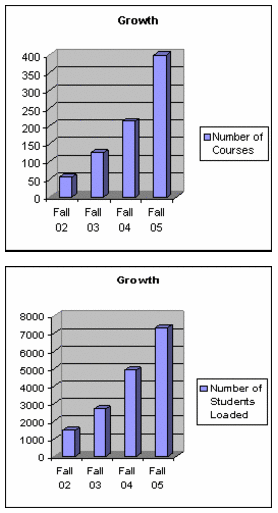
Blackboard Statistics for Fall 2005
(as of August 29, 2005)
  • 400 courses
  • 135 instructors
  • 7328 students loaded

Hits to the Support Site for Distance and Distributive Learning
http://Tncc.edu/blackboard

Week of 8/22 – 8/28/05

  • 11,665 page views
  • 5,717 visits
  • 2,333 unique visitors

Month of August (through 8/29)

  • 23,838 page views
  • 11,797 visits
  • 3,825 unique visitors

Year-to-date

  • 151,574 page views
  • 104,474 visits
  • 18,427 unique visitors

Keep up the good work!!!!


Friday, August 19, 2005

Respondus, Softchalk and Impatica

Posted on Thursday, August 18, 2005 - 4:02 pm:

We have deployed a VCCS Faculty Software module on the Teach tab that links to download and installation for Respondus, Softchalk and Impatica.

It is set as removable and is also visible for placement.

Thanks David

David Carter-Tod
ITS - Client Services Virginia Community College System
dcartertod@vccs.edu

Monday, August 15, 2005

Blackboard Admin. Meeting Minutes 8/12/05

I've pulled out the revelant portions from the minutes (.pdf):

Changing Passwords
A couple of Blackboard Administrators reported that they are having problems with the instructor’s password in Blackboard 6 reverting to the date of birth.
One of the causes is that data integrity is now being enforced between Blackboard and My VCCS. If someone’s password “switches” to their date of birth, it is because it now synching their passwords. The reason for this issue has not occurred previously was in Blackboard 5, faculty accounts and passwords were created and managed in the GUI. However, in Blackboard 6, accounts are managed through My VCCS. If you have a faculty member whose password reverts to their date of birth, please direct them to the change my password in My VCCS to create a new, more secure password. Password changes are real time from My VCCS to other enterprise systems (please note that passwords in bbtrain and turtle are not updated.)
Another issue that was reported was that instructors are prompted to login when they try to access Blackboard through single sign-on. The ITS Blackboard team has not been able to reproduce this problem. If a user experiences this problem, please open an IssueTrak help ticket.

Blackboard System Settings
Personal Information and Address Book

The personal information and address book are currently turned on in production. These need to be disabled for users, since user data is updated in PeopleSoft. (Note: This setting was changed Friday, August 12 after the meeting.)

Self Enroll Setting
A Blackboard Administrator requested that the “self enrollment” setting be turned
on for faculty to allow students to self enroll in courses, without being batch loaded based on their PeopleSoft registration. Currently self-enrollment is turned off as a feature at the individual course level. This means that an individual instructor cannot turn it on, but a system administrator may do so by accessing the properties of the course from the System Admin control panel. The ITS Blackboard team was told this was inconvenient to have to do this now, when instructors were allowed to do this in Blackboard 5 themselves. It was also mentioned that self-enrollment would be helpful for Organizations.

Saturday, August 13, 2005

New Student Email System!

The new student email system went live Firday, August 13, 2005. The transition was transparent and successful and should pose no problems to your students.

Students' old mail is located at http://oldmail.vccs.edu/ and will be available until September 30, 2005. When students login to their email, they will see directions for forwarding all important messages that they may wish to keep. If you want to view what the students will see go to: https://email.vccs.edu/wm.

All documentation on the new student email (including FAQs) is located at: https://helpnet.vccs.edu/mirapoint/.

Faculty can also 'preview' the new system by logging in with their SIS/Blackboard UserID and password.